
Table of Contents
Introduction to AirPods Firmware Update
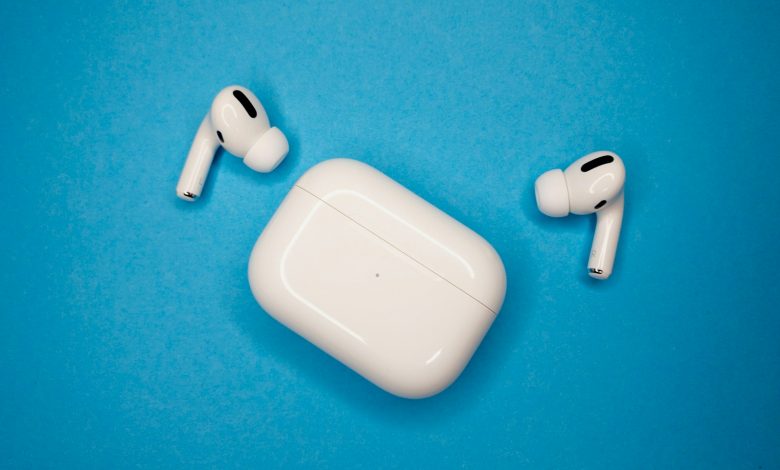
The AirPods lineup, renowned for delivering seamless audio experiences in compact and wireless earbuds, frequently receives firmware updates that aim to refine functionality and resolve issues identified in previous releases. Apple's latest firmware update, version 6A305, is tailored to enhance the AirPods Pro 2, offering users both bug fixes and performance improvements. This update caters to the AirPods Pro 2 variants with either Lightning or USB-C ports.
Overview of the latest firmware 6A305 with bug fixes
The firmware version 6A305 supersedes the earlier 6A303 update released in October. Although Apple traditionally maintains an air of mystery around the specific changes bundled within each firmware revision, the company assures that this latest update is designed to address bugs from its predecessor and potentially introduce other enhancements. Notably, it follows on the heels of significant features introduced in iOS 17, such as Adaptive Audio, Conversation Awareness, and Personalized Volume, hinting at the possibility of further optimizations to these functionalities.
Apple’s indirect update process for AirPods
Updating the firmware on AirPods is a passive process, managed by the devices' internal logic and in concert with an Apple host device. The updates are automatically applied when the AirPods are within Bluetooth range of an Apple product such as an iPhone, iPad, or Mac connected to Wi-Fi, and are charging. Apple does not provide any manual method for initiating these updates. Instead, users are encouraged to place their AirPods in their charging case, connect the case to a power source, and then establish a connection between the AirPods and an iOS or macOS device. This setup typically triggers the process of updating the firmware.
To confirm if an AirPods Pro 2 is running the latest firmware version, users can navigate through the Settings app to the 'Bluetooth' section on their paired iOS device, tap the 'i' icon next to their AirPods' name, and check the firmware version listed. It is by checking here that one can verify the presence of the updated firmware 6A305.
While the process is designed to be inconspicuous and requires minimal user intervention, Apple's approach ensures that enhancements are delivered efficiently and without disrupting the user experience. Information on what each update entails and whether new features are added, or existing ones refined, usually surfaces after enthusiasts and experts have had a chance to explore the changes.
History of Firmware Updates for AirPods Pro 2
The AirPods Pro 2, as the latest iteration in Apple's line of premium wireless earbuds, have undergone a series of firmware updates designed to enhance user experience through new features and bug resolutions. The updates' chronological order is a testament to Apple's commitment to improving functionality post-launch. Firmware version 6A305 is the latest as of the knowledge cutoff date for this article, which progressed through a series of releases including 6A303, 6A301, and the earlier 5E135.
Each firmware iteration provided a layer of performance enhancements or new features. For example, firmware version 6A301 laid the groundwork for several key attributes that users could take advantage of if they had also updated their devices to iOS 17 or macOS Sonoma. This cooperative enhancement between device software and accessory firmware underscores the AirPods Pro 2's integral role within the Apple ecosystem.
New features from firmware 6A300/6A301 for users with iOS 17 and macOS Sonoma
One of the more significant updates came with firmware 6A300/6A301, which unlocked several new features for AirPods Pro 2 when paired with the latest software updates on other Apple devices such as iOS 17 and macOS Sonoma. These features greatly enhanced the auditory experience with Adaptive Audio and introduced practical enhancements such as Conversation Awareness and Personalized Volume. This update also improved the call handling capabilities of the AirPods by adding the ability to press to mute and unmute, which was extended to the AirPods (3rd generation), the original AirPods Pro, and AirPods Max. Additionally, the update notably refined the Automatic Switching feature across all available AirPod models paired with devices running the latest software versions, streamlining the transition of audio output when switching between different Apple products.
The update status of different AirPod models
Firmware updates aren't restricted to the latest AirPods Pro model; they have been rolled out across the range of AirPods to ensure all users benefit from ongoing improvements. The first-generation AirPods are currently on firmware version 6.8.8, the second and third-generation AirPods, as well as the first-generation AirPods Pro and AirPods Max, are on version 6A300. With the different models receiving tailored updates pertinent to their hardware capabilities, Apple demonstrates its inclusive support strategy for devices at varying levels of technology.
The update process remains consistently user friendly and automatic across all models. Users rarely need to take action unless verifying the firmware version post-update. Apple ensures that, whether your AirPods are brand new or a couple of generations old, they receive the same level of attention and care through firmware updates, maximizing their potential and extending their longevity in today's swiftly evolving tech landscape.
New Features in Recent AirPods Pro 2 Firmware Updates
The AirPods Pro 2 have seen a wave of transformative updates with recent firmware releases. Apple has introduced a suite of features to enhance the personal audio experience, making it more customizable and responsive to the user's environment and interactions.
Adaptive Audio combining Active Noise Cancellation and Transparency mode
One of the standout features from the latest updates is Adaptive Audio. This feature represents a dynamic blending of Active Noise Cancellation (ANC) and Transparency mode, responding to the ambient conditions to deliver the optimal auditory experience. As users navigate different settings, from quiet offices to bustling streets, Adaptive Audio automatically adjusts the level of noise control to provide the best listening experience for that moment.
Conversation Awareness for enhancing voices during conversations
Conversation Awareness takes the interaction with others to a new level. When engaged in a conversation, this feature automatically lowers the music volume and boosts the voice of the person speaking to the AirPods Pro 2 wearer, all while minimizing background noise. This intuitive feature allows for clearer communication without the need to remove the earbuds or manually adjust the volume during interpersonal interactions.
Personalized Volume with AI adjustments
Personalized Volume utilizes machine learning technology to adapt to the user's preferred listening levels over time. By analyzing various environmental factors and usage patterns, it fine-tunes the audio output to create a custom media playback experience that is uniquely tailored to the user, offering an optimized volumetric setting for different contexts and media types.
Universal features for all recent models: Mute/Unmute and Automatic Switching improvements
Accompanying the AirPods Pro 2-specific updates, certain improvements have been made available across newer models of AirPods. The inclusion of a Mute/Unmute control feature has enhanced convenience on calls. Users can now press the stem of their AirPods Pro (1st and 2nd generations) or the Digital Crown on the AirPods Max to quickly mute or unmute themselves during calls, providing a hassle-free way to manage audio input while multitasking.
In tandem with these call management enhancements, there have been strides in the Automatic Switching functionality, which now offers a faster and more dependable connection when moving audio play from one Apple device to another. This ensures a seamless transition from personal listening on an iPhone to professional calls on a Mac, further polishing the integrated experience of using AirPods in the Apple ecosystem.
Checking and Installing Firmware Updates
Firmware updates to Apple AirPods, including the latest AirPods Pro 2, are typically a hands-off experience. Unlike many devices that require user action to initiate an update, AirPods are designed to receive and install firmware updates automatically. This process usually occurs without any interruption to the user's experience, ensuring that the AirPods are always operating with the latest features and performance improvements provided by Apple.
The automatic and inconspicuous nature of AirPods updates
Updates are delivered silently to the AirPods when they meet certain conditions: the AirPods must be within the Bluetooth range of a connected Apple device, such as an iPhone, iPad, or Mac, which is in turn connected to a Wi-Fi network. Moreover, for the update to proceed, the AirPods need to be placed in their charging case and connected to a power source. This seamless update mechanism ensures devices are kept up to date with minimal user intervention.
Steps to potentially initiate updates
In instances where users suspect that their AirPods have not automatically updated, they can attempt to trigger the process manually. While there is no direct 'Update' button, users can encourage their AirPods to sync with Apple's servers by reconnecting to Wi-Fi and Bluetooth, placing the AirPods in their case, and charging them near a connected iOS device. This combination often initiates the firmware update process if an update is pending.
Finding out the firmware version through the Settings app
For users who wish to verify the current firmware version of their AirPods, the process is straightforward. On an iPhone or iPad, this involves navigating to the Settings app, selecting Bluetooth, and tapping the 'i' icon next to the AirPods in the device list. The firmware version is listed under the About section. Similarly, Mac users can find the firmware version by using the System Information application or the Bluetooth section within the latest macOS versions.
If discrepancies between the firmware version on the AirPods and the latest version listed by Apple or other reliable sources are found, users may need to visit an Apple Store or an Apple Authorized Service Provider to investigate the issue further. However, due to the update process's simplicity and reliability, such discrepancies are rare occurrences for most users.




